Putty Buddies
User Manual
Overview
Mold your mix like putty. Putty Buddies is a dual-band spectral processor for real-time demasking. Create space between kick and bass or vocals and instrumentals and allow for greater headroom for louder mixes.
Perceptual loudness modelling ensures accurate loudness compensation, and formant preservation maintains the character of the source. Both aiding in transparent demasking.
Formats: AU / VST3 — macOS & Windows
Interface
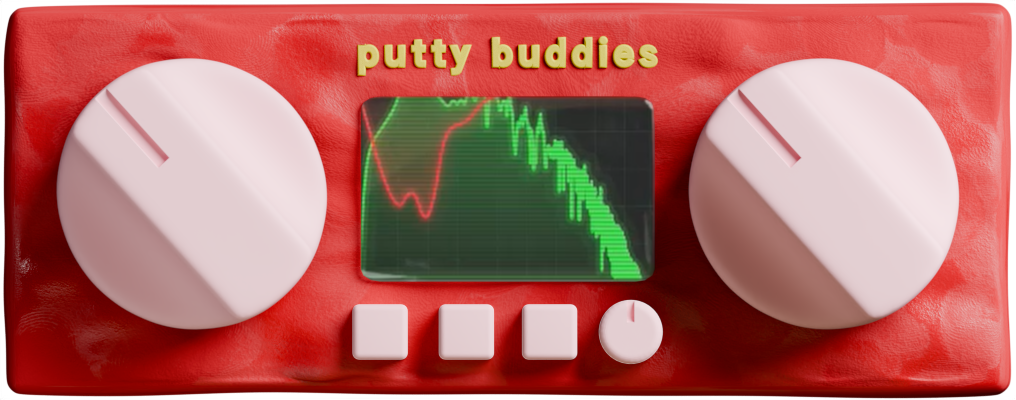
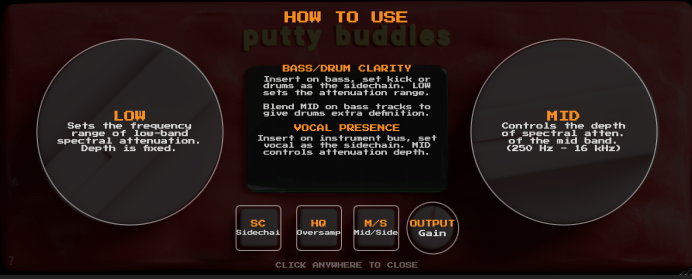
Click the ? button at the bottom left to see the help overlay
- Low Cutoff Knob (left): Sets the crossover frequency between the low and mid bands. Frequencies below the cutoff are processed by the low-band engine, which is tailored for bass and kick frequencies.
- Mid Depth Knob (right): Controls the amount of spectral reduction in the mid/high-frequency band. Higher values apply more aggressive ducking to resonances and demasking frequencies.
- Output Gain Knob (small, center bottom right): Adjust make-up gain for level matching and utility (-12 to +12 dB).
- Spectrum Display (center): Real-time FFT analyzer. Green shows the input spectrum, red shows applied gain reduction.
Toggle Buttons
The three buttons along the bottom control processing modes:
- Ext. Sidechain: Enables external sidechain input. When on, the plugin uses a separate audio bus to determine where to apply ducking. When off, it uses the target signal itself.
- M/S Mode: Switches between standard L/R stereo processing and Mid/Side processing. M/S mode processes center and side information separately, driven by the internal or external sidechain source.
- HQ: Enables 2x oversampling for higher quality processing. Increases CPU usage.
Factory Presets
- kick'n'808: Pre-configured for sidechaining a kick or 808 into a bass track to reduce low-end build-up. External sidechain enabled with low cutoff set around 1900 Hz.
- Vocal Demask: Pre-configured for sidechaining vocals into an instrumental bus. Mid Depth active with M/S mode enabled to preserve stereo imaging while creating space in the center channel where the vocals can sit.
Quick Start
- Insert Putty Buddies on the track you want to duck (e.g. bass).
- Enable Ext. Sidechain and route the competing signal (e.g. kick) to the sidechain input in your DAW.
- Set the Low Cutoff to define the boundary between the low and mid bands. The crossover is gradual; higher values extend the low band, allowing more of the source signal to drive the ducking.
- Adjust Mid Depth to control how much the mid/high frequencies duck when the sidechain is active. You can think of this as the presence knob.
- Listen and Observe: green is the incoming signal, red shows where ducking is happening. Adjust until you see and more importantly hear clean separation without over-processing.
Installation
macOS
Run the .pkg installer. Plugins are installed to:
~/Library/Audio/Plug-Ins/Components/(AU)~/Library/Audio/Plug-Ins/VST3/(VST3)
Windows
Run the .exe installer. The VST3 plugin is installed to:
C:\Program Files\Common Files\VST3\(VST3)
License & Trial
Putty Buddies includes a free 7-day trial. During the trial, the plugin is fully functional with no limitations.
After purchasing, you'll receive a license key in your confirmation email and on the downloads page. Enter it in the splash screen that appears when the trial has expired to activate the plugin.
System Requirements
- macOS 10.15 (Catalina) or later
- Windows 10 or later
- VST3 or AU compatible DAW
- 64-bit only