Gentle Rider
User Manual
Overview
Gentle Rider is a timbral-aware vocal rider that works on gentle, whispered, and breathy vocals, not just loud, full-chested performances.
Where existing vocal riders are often spectrally blind—only seeing amplitude, Gentle Rider uses spectral analysis to recognize vocal content by its characteristic sound (formant structure and spectral shape) regardless of volume. It continuously and smoothly rides vocal level to a target output level without boosting breaths or room noise.
Formats: AU / VST3 — macOS & Windows
Interface

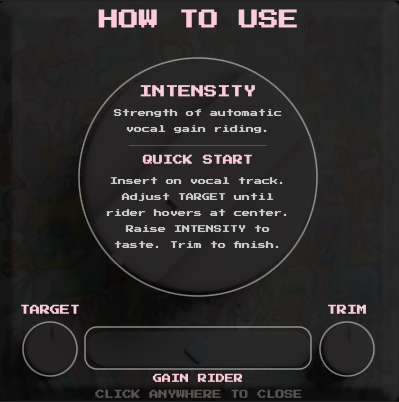
Click the ? button at the bottom right to see the help overlay
- Intensity Knob: The large center knob is the main control. It combines confinement (how tight the riding is) and speed (how fast it reacts) into one knob. Turn it up for tighter, more aggressive leveling; keep it low for gentle, transparent riding that preserves dynamics.
- Target Knob: Set the target level the rider aims to maintain (-36 to 0 dB, default -18 dB). The algorithm continuously adjusts gain to keep vocals hovering around this level.
- Trim Knob: Post-rider gain adjustment for final output level (-12 to +12 dB).
- Rider Display: The horizontal diamond indicator shows the gain adjustment being applied in real time. Center = no change, right = boosting, left = cutting.
How It Works
Traditional vocal riders use simple amplitude thresholds to detect vocals. When a vocal gets quiet i.e. whispers, breathy passages, falsettos, I've found that traditional riders often lose track of what is vocal vs noise and either stop riding or boost awkward parts of the vocal or noise and breaths.
Gentle Rider uses spectral analysis to calculate a continuous vocal confidence score. This means it recognizes when audio "sounds like a voice" regardless of its timbre or how quiet it is.
Quick Start
- Insert Gentle Rider on your vocal channel.
- Set the target level to where you want the vocal to sit. It's easiest and yields the best result to try to roughly match the level of the incoming signal. -18 dB is the default calibration.
- Turn up intensity until the vocal feels consistent without sounding over-processed. Low values preserve natural dynamics; high values ride the level more tightly.
- Adjust trim to fine tune output levels.
Tips
- Gentle Rider works best early in your vocal chain, before compression, EQ, and effects.
- For dynamic, expressive performances with big volume swings, start with a low intensity (20–30%) and increase until the level feels even.
- For podcasts or voiceover, try a higher intensity (50–70%). Adjust trim to match broadcast-ready levels.
- Double-click any knob to reset it to its default value.
Installation
macOS
Run the .pkg installer. Plugins are installed to:
~/Library/Audio/Plug-Ins/Components/(AU)~/Library/Audio/Plug-Ins/VST3/(VST3)
Windows
Run the .exe installer. The VST3 plugin is installed to:
C:\Program Files\Common Files\VST3\(VST3)
License & Trial
Gentle Rider includes a free 7-day trial. During the trial, the plugin is fully functional with no limitations.
After purchasing, you'll receive a license key in your confirmation email and on the downloads page. Enter it in the splash screen that appears when the trial has expired to activate the plugin.
System Requirements
- macOS 10.15 (Catalina) or later
- Windows 10 or later
- VST3 or AU compatible DAW
- 64-bit only
- Latency: ~5ms (look-ahead buffer)